Architecture and security
Microsoft 365 security and data controls before Copilot
Copilot reflects the Microsoft 365 environment beneath it. Identity, permissions, sharing, information protection, audit and retention should be understood before broad use.
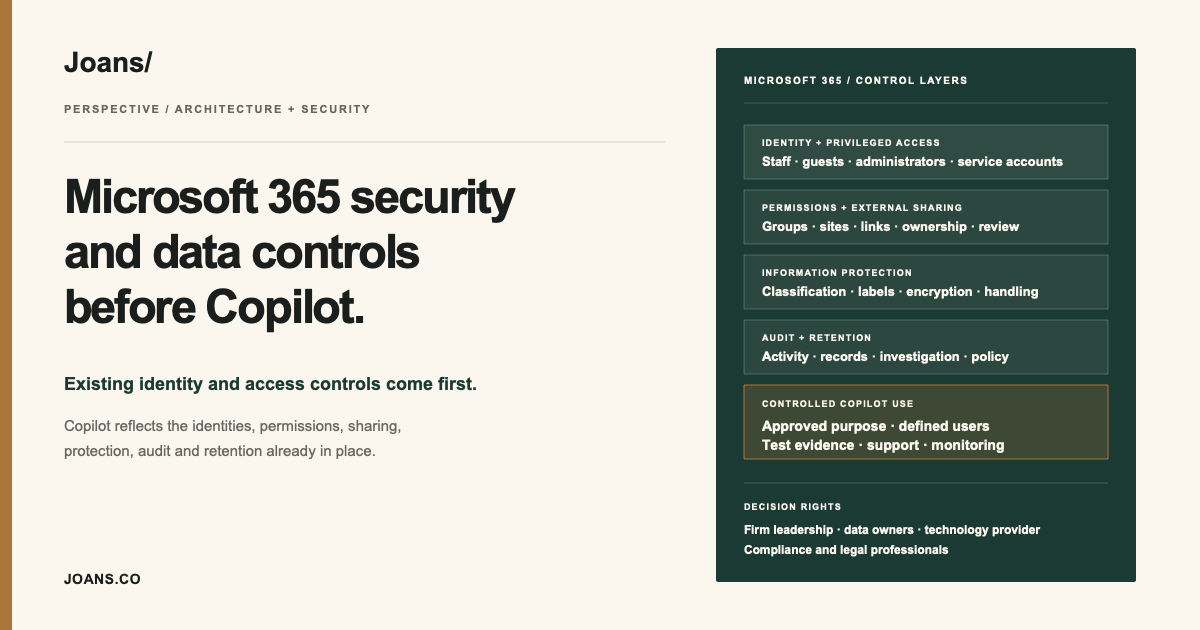
Copilot begins with the environment already in place
Microsoft 365 often holds a wealth firm's email, calendars, working documents, Teams conversations, SharePoint sites, OneDrive files, user identities, and administrative roles. Copilot works across that environment; it does not arrive with a separate, clean set of permissions and records.
Microsoft's documentation states that Microsoft 365 Copilot only presents information a user is authorized to access and that it operates with existing Microsoft 365 security and compliance capabilities. That makes the current tenant the place to begin. Access that is technically permitted but no longer appropriate remains a problem.
A pre-Copilot review should show how business purpose, identity, data, technical configuration, provider responsibilities, operating procedure, and evidence fit together. A license decision comes later.
Identity and privileged access
Start with the identities that can enter or administer the environment. Confirm how staff, contractors, guests, service accounts, and emergency administrators are authenticated and removed. Separate routine work from privileged administration and keep the number of people able to change security settings deliberately small.
Review multifactor authentication, Conditional Access, dormant accounts, group ownership, administrative roles, service accounts, and offboarding. Where a provider administers the tenant, document which people can act, how privileged access is approved, and what activity the firm can review.
Permissions and sharing
Copilot can expose the practical consequences of permissions that accumulated over years. SharePoint sites may include broad groups. Teams may retain external guests. OneDrive links may outlive the matter for which they were created. Old folders may still be visible to people who changed roles.
Review access from the business owner's perspective, not only from the administrator's console. For each material location, identify the owner, intended audience, external sharing position, and next review date. Remove stale access before asking a new capability to search across it.
Information protection
Microsoft documents how Purview sensitivity labels, encryption, and related controls interact with Microsoft 365 and Copilot. Those features are useful only when their configuration matches the firm's information.
A short classification model is usually more effective than a long list no one applies. It should distinguish public information, internal operating material, confidential firm information, customer information, and any categories that require additional restriction. Labels, sharing rules, and handling instructions should express those distinctions consistently.
Confirm the licenses and configuration required for each control. Product names alone do not establish that a feature is available, enabled, or operating as intended.
Audit and retention
The firm should decide which activity it needs to reconstruct and how long the relevant records must remain available. Microsoft describes auditing and content-management capabilities for Microsoft 365 Copilot, but the usable evidence depends on licensing, configuration, retention settings, and the investigation process around them.
Test the questions the firm may later need to answer. Which identity performed the action? Which information was available? What output was retained? Did a person review it? Can an administrator retrieve the record without assembling it manually from several consoles?
Retention also needs an operating owner. Keeping everything indefinitely creates a different risk from deleting material too early. The firm's policy, legal obligations, and actual system settings should agree.
A controlled order of work
A controlled rollout can follow this order.
- Establish identity and privileged-access standards.
- Review group membership, site permissions, guests, and external sharing.
- Align information protection with the firm's real data categories.
- Configure and test audit, retention, and investigation procedures.
- Select a limited set of uses and a clearly defined user group.
- Monitor access, exceptions, support issues, and retained evidence before expanding.
Different specialists own different decisions. Firm leadership approves the business use. Data and business owners confirm who should see the information. The technology provider configures and operates the tenant. Qualified compliance and legal advisers interpret regulatory obligations. Architecture keeps those decisions connected so the operating team can follow them.